
Digital Calipers Accuracy: Common Errors and Fixes
Why do digitalcalipers show different readings for the same part?
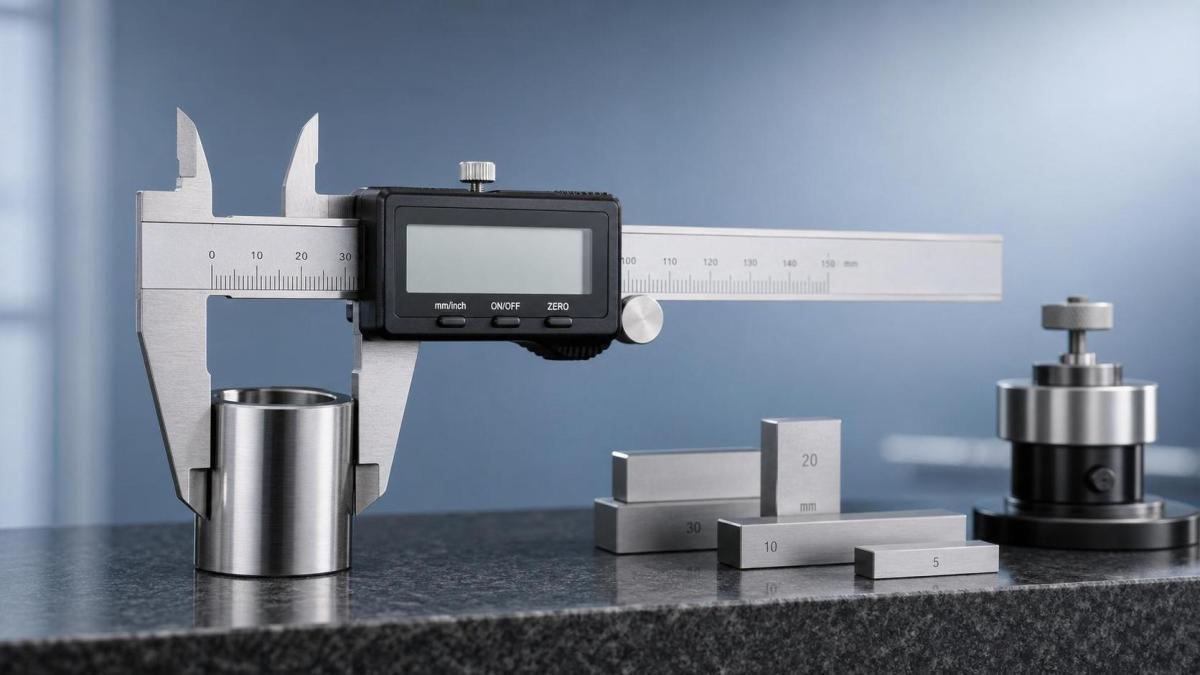
Even high-quality digitalcalipers can drift from reliable measurement when small habits go unnoticed. That is why repeated checks on one feature sometimes produce conflicting numbers.
In most cases, the problem is not a dramatic instrument failure. More often, it starts with zero loss, dirty jaws, weak battery output, uneven pressure, or slight jaw misalignment.
This matters across general industry, from machine shops to inspection benches. A few hundredths of a millimeter can change assembly fit, coating thickness acceptance, or basic go/no-go decisions.
G-UPE often emphasizes a simple principle seen in advanced metrology as well: trustworthy data begins long before final inspection. Stable handling and repeatable method matter as much as the display itself.
If digitalcalipers feel inconsistent, the best starting point is to separate operator error from tool condition. Once that is clear, most accuracy issues become easier to correct.
Which accuracy mistakes happen most often in daily use?
The most common errors are surprisingly ordinary. They appear during fast routine work, especially when parts, tools, and hands all move quickly.
A useful way to judge the situation is to compare the symptom with the likely cause before adjusting technique or replacing the instrument.
In actual use, digitalcalipers are often blamed too early. The faster check is to repeat the same feature three times with a slower hand and a cleaner setup.
If the spread quickly narrows, the issue is likely procedural. If it does not, the tool may need maintenance, battery replacement, or calibration review.
How can you tell whether the problem is technique or the caliper itself?
This is one of the most useful questions because it prevents wasted time. A poor method can imitate a damaged tool, while a damaged tool can mislead even careful work.
Start with a clean reference item, such as a gauge block, ring, or known master. Measure it several times without changing hand position too much.
When digitalcalipers repeat well on the reference but fail on production parts, the part geometry or handling method is usually responsible. Burrs, taper, heat, and unstable support are common reasons.
When the reference reading also wanders, the tool needs closer attention. Check battery condition, slider smoothness, jaw wear, and whether the display returns to zero reliably.
- Close the jaws gently and confirm a stable zero.
- Inspect jaw faces for chips, oil film, lint, or fine dust.
- Slide the beam slowly and feel for drag or looseness.
- Compare results with a second measuring tool if available.
This disciplined check mirrors broader metrology practice seen in high-precision sectors tracked by G-UPE. Reliable measurement depends on traceability, controlled surfaces, and repeatability before conclusions are made.
What is the right way to fix inaccurate digitalcalipers without overcomplicating the process?
A practical fix sequence works better than random troubleshooting. Most operators do not need a long technical procedure. They need a short routine that catches the usual faults.
Begin with cleaning. Wipe the jaws, beam, and depth rod using a lint-free cloth. If needed, remove light residue carefully, then close the jaws and set zero again.
Next, replace the battery if the display has dimmed, flickered, or changed values unexpectedly. Low battery behavior in digitalcalipers is a frequent source of false suspicion.
Then check measuring technique on the actual feature type. Outside, inside, step, and depth measurements each fail in different ways if jaw angle or contact pressure is inconsistent.
A short correction routine that usually works
- Clean jaws and reference surfaces before every check.
- Zero the digitalcalipers only after fully closing the jaws.
- Use consistent thumb pressure, never a forced squeeze.
- Rock slightly on round parts to find the true size.
- Keep hot parts from hand heat or process heat away until stable.
- Verify with a known standard when results affect acceptance.
More serious issues include worn jaws, bent beams, or slider play. At that point, cleaning will not restore confidence, and calibration or replacement becomes the sensible next step.
When are digitalcalipers good enough, and when should another tool take over?
Digitalcalipers are versatile, fast, and widely trusted for routine dimensional checks. They work well for general outside dimensions, internal widths, step checks, and basic depth work.
Still, they are not the best answer for every tolerance. On very tight features, narrow grooves, soft materials, or highly critical acceptance points, another tool may be safer.
For example, a micrometer usually offers better control for tight outside dimensions. Bore gauges help with internal features. A height gauge or CMM becomes more reliable for complex datums.
That distinction is familiar in advanced manufacturing fields covered by G-UPE, where measurement method selection is treated as part of process control, not just final inspection.
The real question is not whether digitalcalipers are good or bad. It is whether the tool matches the tolerance, surface condition, and inspection risk of the task.
How do you keep digitalcalipers accurate over time?
Long-term accuracy is usually the result of small routines. Waiting for a major failure often means unreliable readings have already affected work for some time.
Storage is part of the answer. Keep digitalcalipers clean, dry, and protected from chips, coolant mist, and impact. Leaving them loose on benches shortens confidence as much as service life.
Periodic verification is equally important. A simple schedule with reference checks catches drift early, especially where environmental conditions vary from station to station.
It also helps to standardize how measurements are taken. The same part can read differently when each person applies different pressure, angle, or alignment habits.
Good maintenance habits worth keeping
- Check zero at the start of each shift.
- Replace batteries before display behavior becomes unstable.
- Protect the jaws from knocks and side loading.
- Verify against standards at a defined interval.
- Remove damaged tools from use immediately.
Where accuracy carries wider process consequences, it is worth aligning these checks with documented metrology practice. That approach supports consistency, traceability, and fewer disputed measurements.
What should you do next if readings still cannot be trusted?
If digitalcalipers still produce doubtful results after cleaning, zero reset, battery replacement, and reference checks, stop treating the issue as a minor annoyance.
First, document where the problem appears. Note whether it affects outside, inside, depth, or step measurement. That pattern often points directly to jaw wear or beam damage.
Next, compare the suspect tool with a verified standard or another calibrated instrument. If the difference remains repeatable, the digitalcalipers should be serviced, recalibrated, or replaced.
The broader lesson is straightforward. Measurement confidence comes from method, condition, and verification working together. When any one of those breaks down, readings stop being decision-grade.
A practical next step is to review current handling, define a quick verification routine, and match each measurement task to the right instrument. That creates far fewer surprises than troubleshooting after rejection starts.
Taglist:
Recent Articles
 2026.09.25Which ISO standards apply to precision-engineered medical devices?ISO standards for precision engineering medical devices: explore ISO 13485, ISO 14971, metrology, biocompatibility, sterilization, and packaging requirements.
 2026.09.24How to choose athletic clothing that stays comfortable in humid weatherAthletic clothing for humid weather: learn how to choose breathable fabrics, low-chafe fits, and quick-drying layers for more comfortable workouts.
 2026.09.23How sheet metal welding choices affect dimensional accuracySheet metal welding choices shape dimensional accuracy. Explore heat input, joint design, fixturing, and inspection strategies to reduce distortion and improve repeatability.
 2026.09.22How specification preparation prevents flow-control errors in process systemsSpecification preparation for process systems prevents flow-control errors by defining operating ranges, pressure budgets, accuracy, materials, and control requirements before equipment selection.
 2026.09.21How to assess a German mass flow controller supplier for cleanroom useIndustrial & Manufacturing equipment supplier in Germany: assess cleanroom MFC partners for gas compatibility, leak integrity, calibration traceability, and lifecycle service.
 2026.09.20How to assess aerospace component manufacturing services for tight tolerancesAerospace component manufacturing services: learn how to verify tight-tolerance capability through metrology, process control, special-process oversight, and traceability.
 2026.09.19When does polycarbonate roofing need UV protection on both sides?Polycarbonateroofing: learn when dual-sided UV protection prevents yellowing, installation errors, and reflected-light damage in demanding roof designs.
 2026.09.18When high precision coordinate measuring machines justify tighter tolerancesHigh precision coordinate measuring machines justify tighter tolerances when uncertainty, process capability, and traceability protect critical performance. Explore smarter decisions.
 2026.09.17How can retailers verify safety before buying Montessori toys wholesale?Montessoritoyswholesale safety guide: verify SKU-specific tests, labels, traceability and market compliance before ordering.
 2026.09.16How to assess surgical instruments for reliable sterilizationAssess surgical instruments for reliable sterilization with practical guidance on cleanability, material compatibility, inspection, and validated reprocessing.
 2026.09.15How material science for food ingredients improves shelf stabilityMaterial Science for food ingredients reveals how moisture control, encapsulation, oxidation management, and smart packaging extend shelf life and protect quality.
 2026.09.14What purity specification do laboratory gases need for trace analysis?Ultra-high purity gases for laboratory use: learn how to specify, verify, and control critical impurities for reliable trace analysis and lower backgrounds.
 2026.09.13How to verify a lubricants exporter’s product quality before orderingLearn how to verify a lubricants exporter before ordering—from batch CoAs and lab tests to traceability, packaging, and export compliance. Reduce equipment and shipment risks.
 2026.09.12When does export control compliance training need to be refreshed?Export control compliance training: learn when annual and event-driven refreshers are needed to manage regulatory, product, access, and supply-chain risks.
 2026.09.11What makes a diaper bag backpack comfortable for all-day outings?Discover how a diaperbagsbackpack delivers all-day comfort with padded straps, breathable support, smart storage, and balanced capacity for stress-free outings.
 2026.09.10How nano-positioning stages enable sub-nanometer manufacturing precisionSub-nanometer manufacturing demands more than fine resolution. Discover how nano-positioning stages deliver stable, accurate motion through advanced feedback, control, and error management.
 2026.09.09How to validate biological implants for biocompatibility riskBiological implants validation: learn how to assess biocompatibility risk with ISO 10993, chemical characterization, and manufacturing controls.
 2026.09.08What to verify before selecting an XYZ translation stage OEM factoryXYZ translation stage OEM factory selection guide: verify volumetric accuracy, payload stiffness, traceable testing, controls, and acceptance criteria before ordering.
 2026.09.07How to match mining equipment to different extraction conditionsMining equipment selection made practical: match machines to rock, mine geometry, ground conditions, capacity, energy, and maintenance needs for safer, more productive extraction.
 2026.09.07Global photonics alignment market analysis: what is driving demand?Global photonics alignment market analysis: discover how semiconductor packaging, optical communications, sensing, and automation are driving demand for scalable, high-yield alignment solutions.
 2026.09.05When do Ultra-Precision Engineering consulting services add value?Ultra-Precision Engineering consulting services help buyers reduce qualification risk, validate real-world performance, and control lifecycle costs before committing to complex suppliers.
 2026.09.04How to choose a nano-indentation system for reliable hardness testingLearn how to choose a nano-indentation system for hardness testing with confidence. Compare calibration, load control, drift stability, test modes, data quality, and application fit for reliable results.
 2026.09.03When does a bridge CMM outperform a portable measuring arm?CMM systems: discover when a bridge CMM delivers superior repeatability, tighter uncertainty control, and dependable inspection results over a portable measuring arm.
 2026.09.02How does industrial innovation analysis guide technology choices?Industrial Innovation analysis helps manufacturers choose technologies with confidence by evaluating performance, integration, compliance, and lifecycle risks. Discover a smarter decision framework.
 2026.09.01How precise must micro-manipulation systems be for microassembly?Micro-manipulation systems for microassembly: learn how to match precision, repeatability, feedback, and error budgets to achieve reliable, high-yield assembly.
 2026.08.31What to verify before choosing a wafer probe station exporterWafer probe station exporter selection starts with verified performance, integration, export readiness, and lifecycle support. Learn what to check before you buy.
 2026.08.30When does pulse welding improve precision in a micro-welding workstation?Micro-welding workstation pulse welding improves precision by controlling heat, reducing variation, and protecting delicate assemblies. Discover when it delivers measurable results.
 2026.08.29When does machine learning improve defect detection in CMM inspection?Machine learning improves CMM defect detection when measurement data is stable, traceable, and actionable. Learn how to spot early drift, prioritize risk, and strengthen quality decisions.
 2026.08.28How to compare nano-fabrication tools in North America for probe-station workCompare nano-fabrication tools North America labs use for probe-station work—evaluate motion, optics, touchdown control, thermal stability, and service support.
 2026.08.27When does biomass energy make financial sense for industrial heat?Biomass energy can cut industrial heat costs when demand, fuel supply, logistics, and compliance align. Explore the key financial tests for a resilient investment.
 2026.08.26What to check before choosing an OEM PZT driver manufacturerPZT driver manufacturer OEM selection starts with application fit. Learn what to check on stability, load matching, compliance, and lifecycle support before you buy.
 2026.08.25What a battery management system must monitor to prevent cell failureBattery management system essentials: learn what to monitor at cell level—voltage, current, temperature, SOC, balancing, and deviation trends—to prevent cell failure and improve battery safety.
 2026.08.24How long do hybrid car parts last before replacement becomes likelyHybrid car parts do not all wear out at the same pace. Learn the warning signs, lifespan factors, and when replacement is truly likely before costs rise.
 2026.08.23How to tell if an exporters directory is reliable before you use itExporters directory reliability starts with transparency. Learn how to spot verified data, fresh listings, and red flags before trusting any platform for sourcing.










FILTER_CORE
REF_NO: 0042
Editors' Picks
- 00
0000-00
Which ISO standards apply to precision-engineered medical devices? - 00
0000-00
How to choose athletic clothing that stays comfortable in humid weather - 00
0000-00
How sheet metal welding choices affect dimensional accuracy - 00
0000-00
How specification preparation prevents flow-control errors in process systems